# Item Interaction Ecosystem (UE5 Plugin)
Universal, server-authoritative, data-driven framework for items, inventory,
interaction, carrying, equipment, world-slot installation, placement and item
features. Built for co-op horror / survival / extraction / puzzle projects.
Tested compiling against **Unreal Engine 5.7** (`ue5.7` branch) and **5.8** (`ue5.8` branch).
## Architecture at a glance
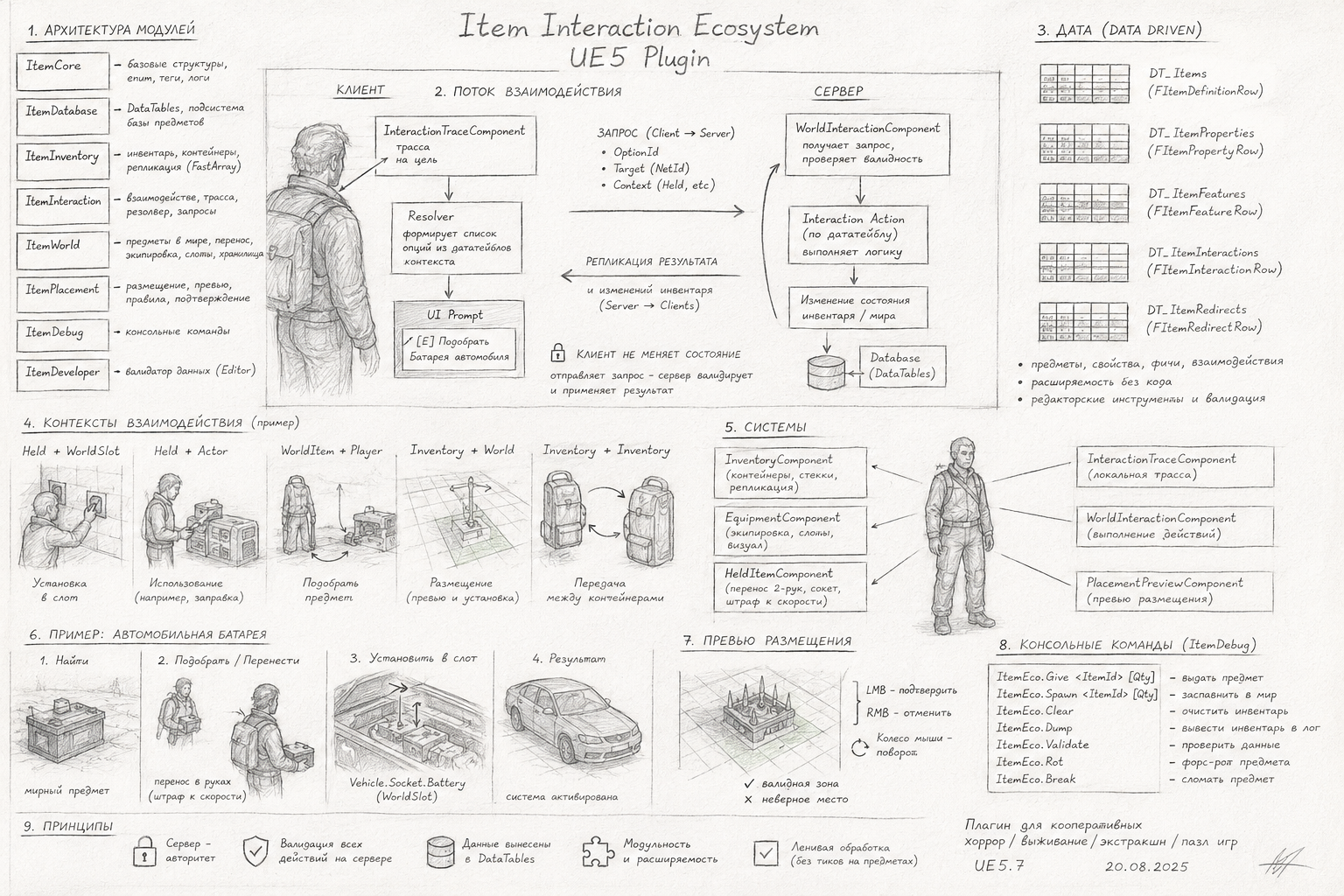
More diagrams (interaction flow, inventory system)
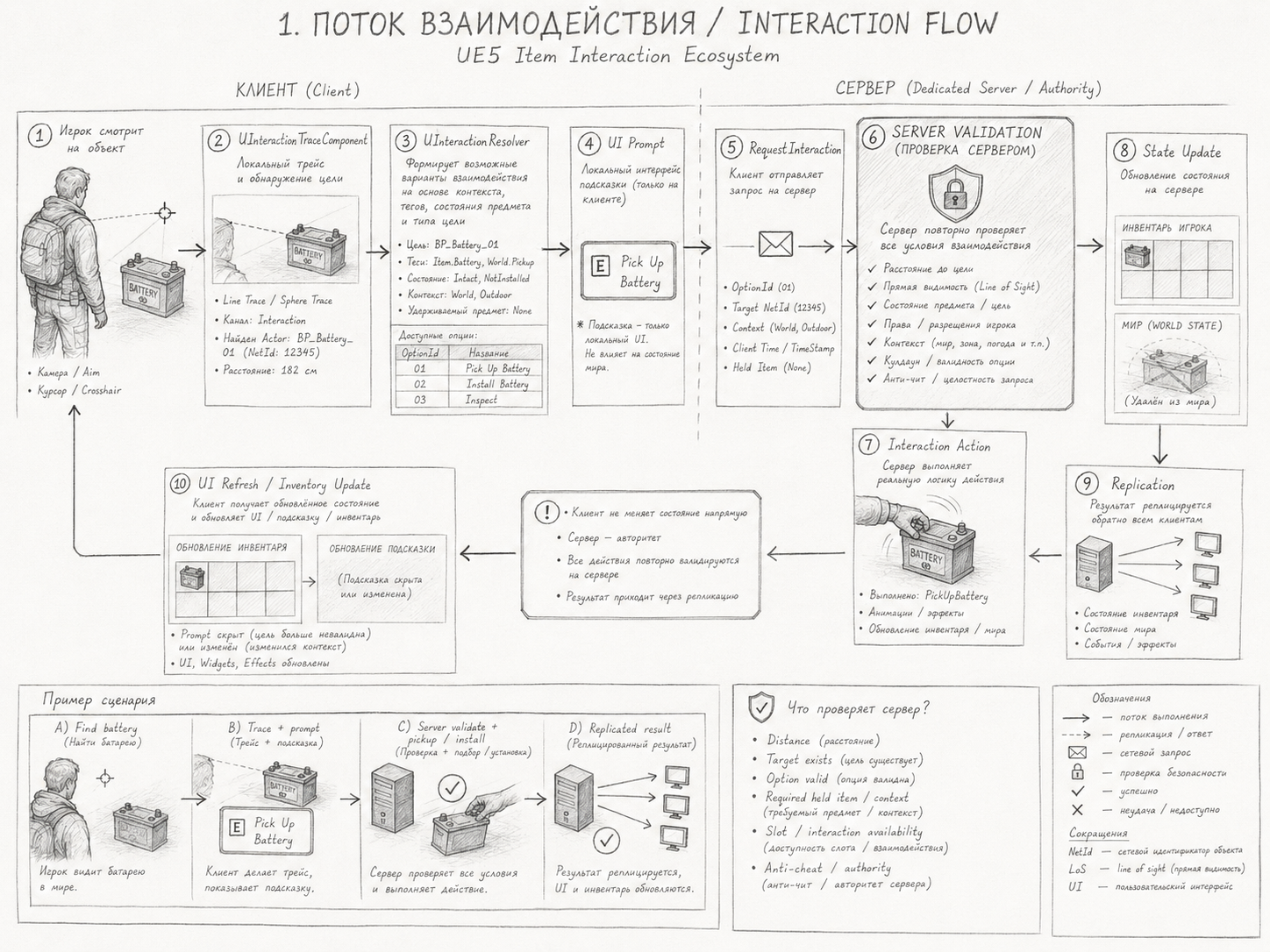
**Interaction flow — client → server → replication**
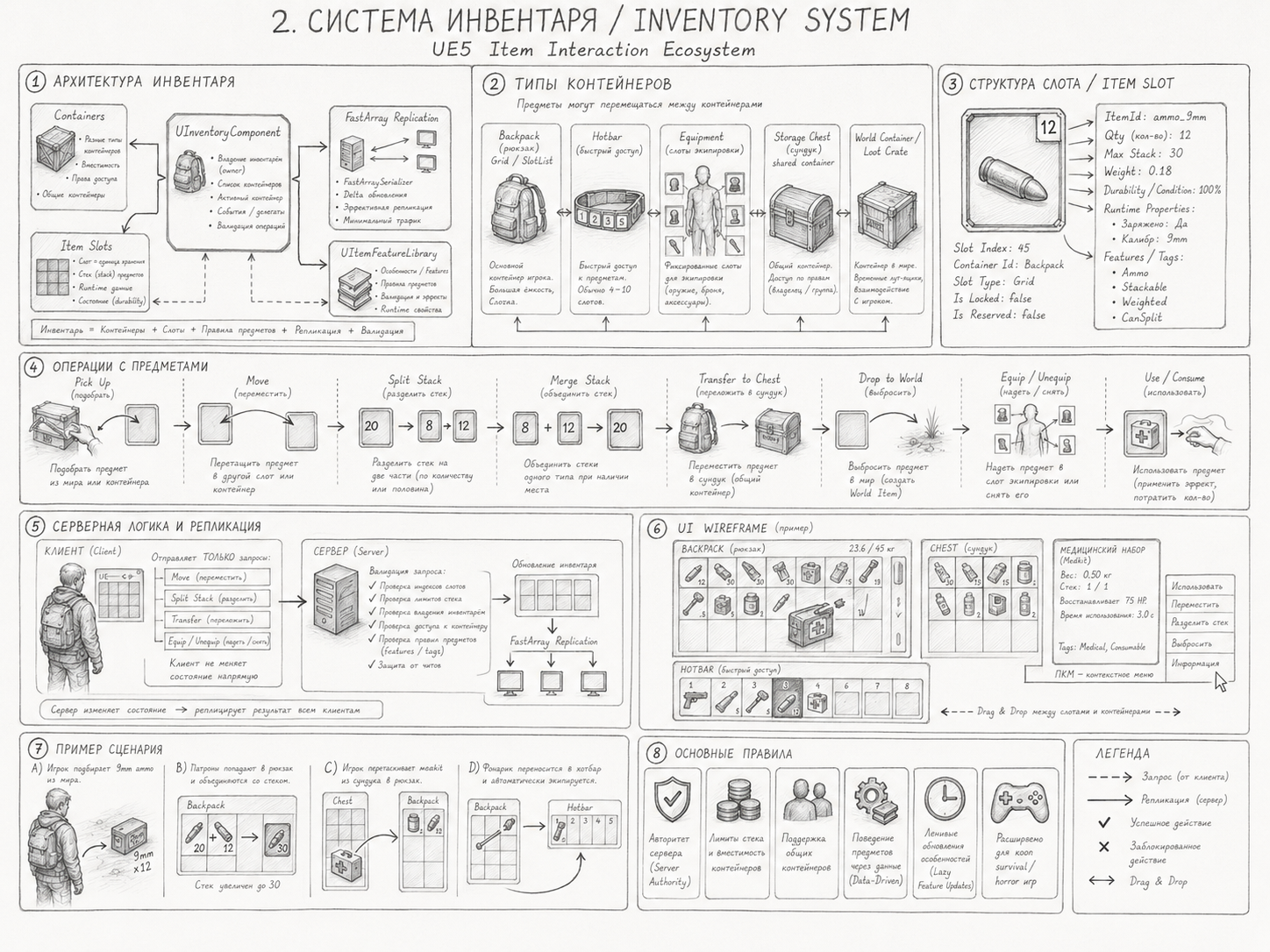
**Inventory system — containers, slots, operations, replication**
> Status: all C++ runtime + editor modules implemented and compiling (spec stages
> 1–11). Binary content (UMG widgets, the test map, and the DataTable *assets*
> themselves) must be authored in-editor — see "Content to author" below. Example
> data is provided as importable CSV under `Docs/ExampleData/`.
---
## Modules
| Module | Type | Responsibility |
|---|---|---|
| `ItemCore` | Runtime | Base structs (`FItemInstanceData`, `FItemRuntimeProperties`, lock data), enums, native gameplay tags, logs |
| `ItemDatabase` | Runtime | `FItemDefinitionRow` + aux rows, `UItemDatabaseSubsystem` (loading, lookup, redirects, validation), Project Settings |
| `ItemInventory` | Runtime | `UInventoryComponent` (FastArray replication), containers, stacking, `UItemFeatureLibrary` |
| `ItemInteraction` | Runtime | Interactable/trace components, `UInteractionResolver`, `UItemInteractionComponent` (server requests + validation) |
| `ItemWorld` | Runtime | `APickupItemActor`, carry (`UHeldItemComponent`), equipment, world slots, `UWorldInteractionComponent`, storage actor |
| `ItemPlacement` | Runtime | `UPlacementPreviewComponent` (ghost preview, rules, server confirm) |
| `ItemDebug` | Runtime | `ItemEco.*` console commands |
| `ItemDeveloper` | Editor | Tools menu → **Validate Item Data** |
Design principle (section 3): the **client never mutates item state** — it sends
requests; the server re-validates and replicates results.
---
## Setup
1. **Enable the plugin** (already referenced by `InventorySystem.uproject`). Build the
`InventorySystemEditor` target.
2. **Create the DataTables** (Content Browser → Miscellaneous → Data Table):
- `DT_Items` — row struct `FItemDefinitionRow`
- `DT_ItemProperties` — `FItemPropertyRow`
- `DT_ItemFeatures` — `FItemFeatureRow`
- `DT_ItemInteractions` — `FItemInteractionRow`
- `DT_ItemRedirects` — `FItemRedirectRow`
Import the CSVs in `Docs/ExampleData/` as a quick start (the flat tables import
cleanly; in `DT_Items` the gameplay-tag *container* columns are easiest to finish
in-editor).
3. **Project Settings → Game → Item Ecosystem** — assign the five tables.
4. **Register the gameplay tags** the data uses (Project Settings → GameplayTags), or
rely on the native ones shipped in `ItemNativeTags.h` (Property.*, Feature.*,
Action.*, Lock.*). Item types / world sockets (e.g. `Vehicle.Socket.Battery`) are
project tags you add.
### Player pawn components
Add to your pawn:
- `UInventoryComponent` — set `DefaultContainers` (e.g. a Backpack SlotList + a Hotbar).
- `UWorldInteractionComponent` — the executor (use this, not the base, to get carry /
drop / equip / install).
- `UHeldItemComponent` — for two-handed carry; set `CarrySocket`.
- `UEquipmentComponent` — for equip visuals; map `SlotSockets`.
- `UInteractionTraceComponent` — local aim trace (drives the prompt).
- `UPlacementPreviewComponent` — if you support placement.
### Input (Enhanced Input, section 24)
Bind these to call into the components:
| Key | Call |
|---|---|
| `E` | `Resolver.GetPrimaryInteraction(pawn, trace.CurrentTarget)` → `WorldInteraction.RequestInteraction(option)` |
| `G` | `HeldItemComponent.RequestDrop()` |
| LMB | `PlacementPreview.ConfirmPlacement()` (while placing) |
| RMB | `PlacementPreview.CancelPlacement()` |
| Wheel | `PlacementPreview.RotatePreview(±10)` |
| `Tab` | open inventory UI |
---
## Console commands (ItemDebug)
```
ItemEco.Give [Qty] Give to the local player inventory
ItemEco.Spawn [Qty] Spawn a world pickup in front of the player
ItemEco.Clear Clear the player inventory
ItemEco.Dump Log all inventory entries
ItemEco.Validate Run database validation
ItemEco.Rot Force-rot the first inventory item
ItemEco.Break Break the first inventory item
```
---
## Demo scenarios → code (section 31)
- **Ammo pickup** — look at `ammo_9mm` pickup → resolver builds `[E] Pick up 9mm Ammo x12`
(capability option) → `WorldInteraction` → `ExecutePickup` adds to inventory, destroys actor.
- **Loot crate** — `AStorageContainerActor` (shared inventory) → `[E] Open` (local UI event
`OnOpenContainer`) → drag → `RequestMoveItem(storage, …)` → validated transfer.
- **Car battery** — carry from world (`ServerHoldWorldItem`, move-speed penalty) → look at
vehicle with `UWorldItemSlotComponent(Vehicle.Socket.Battery)` → DT_ItemInteractions row
`Held+Vehicle → InstallIntoWorldSlot` → `ExecuteInstall` hands the carried actor to the slot.
- **Fuel + generator** — `Held+Generator → UseHeldOnTarget` (hold E). Wire the transfer with
`UItemFeatureLibrary::TransferFuel` in a custom `UInteractionAction` or extend
`WorldInteraction` (`UseHeldOnTarget` currently routes to action classes).
- **Flashlight** — equip from inventory (`UEquipmentComponent::ServerEquip`), item stays in
inventory, `EquippedActorClass` spawns; drain with `UItemFeatureLibrary::DrainBattery`.
- **Placement trap** — `PlacementPreview.StartPlacement(id)` → ghost + `ValidatePlacement`
red/green → confirm → server re-validates → spawns placed actor, removes from inventory.
- **Raw meat rotting** — `UItemFeatureLibrary::UpdateInventoryFeatures` (call on container
open / save load / world-time pulse). Lazy: nothing ticks per item. At freshness 0 it
transforms `raw_meat → rotten_meat`.
---
## Content to author in-editor (binary assets, not creatable from source)
- DataTable assets (import the CSVs above).
- UMG widgets (section 23): `WBP_InventoryRoot`, `WBP_InteractionPrompt`,
`WBP_LootWindow`, `WBP_ActionProgress`, `WBP_PlacementHint`, etc. Bind them to the
components' delegates (`OnInventoryChanged`, `OnTargetChanged`, `OnOpenContainer`,
`OnPlacementStateChanged`) — UI only displays and sends requests (section 25).
- `InventoryInteractionTestMap` (section 30) with pickups, a vehicle (battery/fuel
slots), a generator, a storage chest, a placeable trap surface.
- Skeletal-mesh sockets named to match `CarrySocket` / equipment `SlotSockets` /
world-slot `AttachSocketName`.
---
## Build / validate
```
"\Engine\Build\BatchFiles\Build.bat" InventorySystemEditor Win64 Development ^
-Project="\InventorySystem.uproject" -WaitMutex
```
Then in-editor: Tools → Item Ecosystem → **Validate Item Data**, or `ItemEco.Validate`
in PIE.